
How to Save TikTok Recipes for Later (Without Losing Them Forever in Your Saved Folder)
The saved folder is where TikTok recipes go to die. Here's a simple system to save TikTok recipes you'll actually cook, with the ingredients and steps pulled out automatically.
You know the drill. You're scrolling TikTok at 11pm. Someone's making the most absurdly good-looking pasta with exactly four ingredients. You double-tap, hit save, tell yourself you'll cook it this weekend. Three months later your saved folder has 847 recipes and you couldn't name a single one.
The saved folder is where TikTok recipes go to die. It's designed for re-watching, not for cooking. Finding a specific recipe means scrolling past every fridge reorganization and gym transformation you also saved that week. And even when you find the video, you're squinting at on-screen text, pausing every 2 seconds, screenshotting ingredient lists, trying to figure out if the measurements were in cups or grams.
This guide walks through a better system: how to save TikTok recipes in a way that actually gets you cooking them.
Why the TikTok saved folder fails for recipes
Three reasons the default saved folder is the wrong tool for recipes:
- No search. You can't type "that creamy chicken thing" and find it. The saved folder is chronological, so a recipe from February is buried under every reel you've saved since.
- No ingredient list. The recipe is locked inside the video. You're stuck pausing, rewinding, and squinting at tiny on-screen text to figure out quantities.
- No categorization. Weeknight dinners, holiday desserts, meal prep, party snacks: they're all mixed together in one endless scroll.
A system that works for recipes needs three things the saved folder doesn't give you: searchable text, extracted ingredients and steps, and a way to sort by type of meal.
A simple system for saving TikTok recipes you'll actually cook
Here's the setup I recommend. The whole thing takes about 3 minutes to start, and every new recipe you save after that takes 10 seconds.
Step 1: Stop saving inside TikTok
Counterintuitive, but the saved folder is the problem. From now on, when you see a recipe you want to cook:
- Tap Share on the video.
- Instead of saving, send the link somewhere you can search and organize.
You have two options: a note-taking app (Notion, Apple Notes, Google Keep) or a tool that does the transcription and ingredient extraction for you.
Step 2: Get the recipe out of the video
If you're doing this manually in a notes app, you'll need to watch the video, transcribe the ingredients and steps, and paste them with the original TikTok link. This works but takes 5–10 minutes per recipe, which is why most people give up and go back to saving inside TikTok.
The faster path is to use a tool that pulls the recipe out for you. LilyBoard does this automatically: you send a TikTok link to @lilyboardco on Instagram DM, and within a few minutes you get back:
- A full ingredient list with quantities
- Step-by-step instructions
- Any tips, variations, or substitutions the creator mentioned
- A searchable transcript of the whole video
No pausing, no squinting, no screenshotting.
Step 3: Organize by meal type, not by date
However you're saving them, group recipes the way you'll actually use them. Weeknight dinners, weekend projects, desserts, lunches you can meal-prep on Sunday. When Wednesday at 6pm rolls around and you don't know what to make, you want to open the "30-minute weeknight" folder, not scroll through six weeks of chronological saves.
LilyBoard does this automatically: recipes get categorized by cuisine, meal type, and cooking time based on what's in the video.
Step 4: Build a weekly habit, not a hoarding habit
The real problem with the saved folder isn't the folder: it's that saving feels productive even when you never cook the thing. Try this instead:
- Once a week (Sunday works well), pick 2–3 recipes from your saved list for the coming week.
- Actually put the ingredients on the grocery list.
- After you cook one, mark it tried. Add a one-line note: "great but too salty," "kids loved it," "half the garlic next time."
After a month of this, your saved recipes are no longer a graveyard: they're a working cookbook of things you've tested, with notes from your own kitchen.
What this looks like in practice
Here's a real example from a LilyBoard user: a creamy pasta Reel from Italy, turned into a structured recipe.
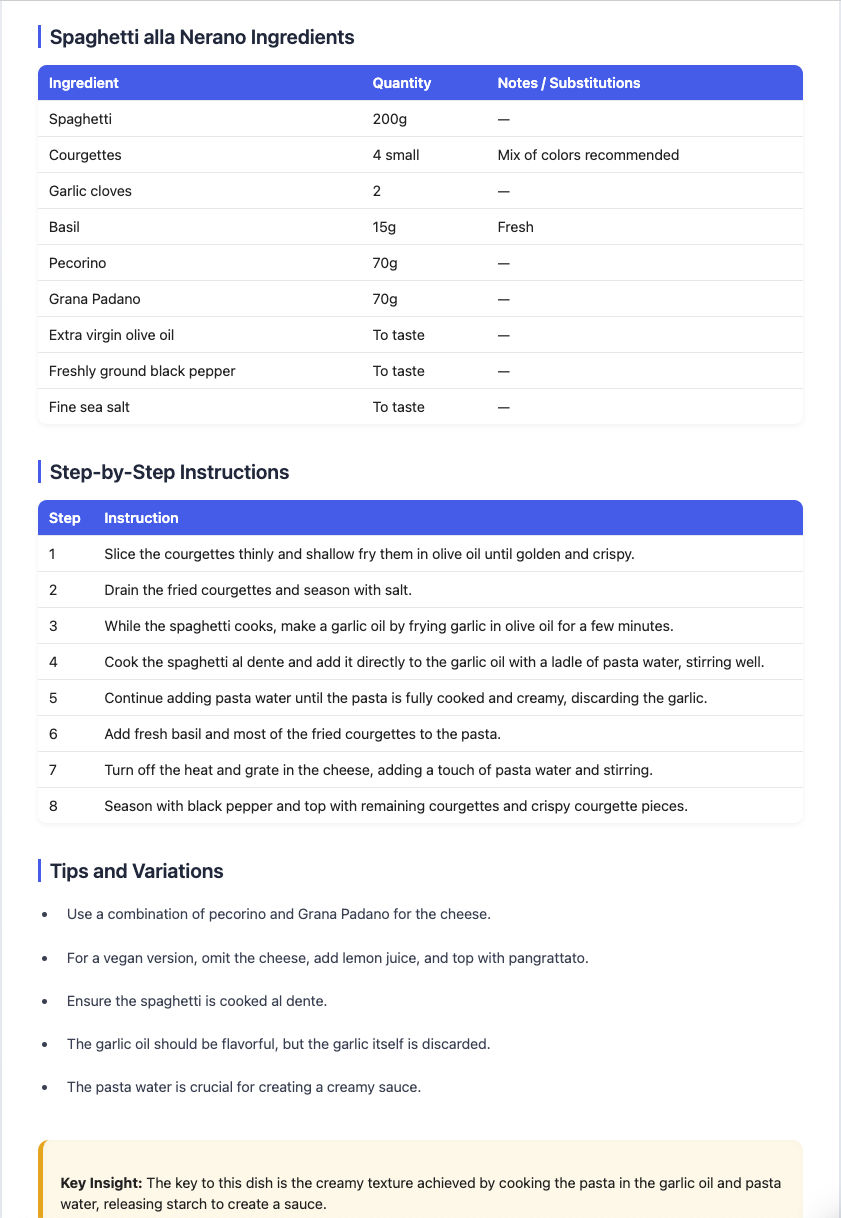
The Reel was 42 seconds long. Nobody is pausing a 42-second video 15 times to catch the measurements. But the output above gives you 9 ingredients with quantities, an 8-step method, tips on frying the courgettes, and a vegan variation, all on one screen. Saved as a searchable recipe, tagged as pasta, Italian, weeknight.
That's the difference between saving a recipe and actually being able to cook it.
A few more tips
- Save the source. Always keep the original TikTok link attached to the recipe. If you have a question about technique, you can re-watch the relevant clip.
- Screenshot the final plating. Before you send the video off to get transcribed, take a screenshot of the finished dish. Looking at the actual food makes you way more likely to cook it this week.
- Be ruthless. If you haven't cooked a recipe after 3 months in your "to try" list, delete it. You won't.
TL;DR
The TikTok saved folder wasn't built for recipes. To actually cook what you save, you need three things it doesn't give you: search, extracted ingredients and steps, and sensible categories.
The easiest way to get all three at once is to send recipe Reels and TikToks to a tool that does the transcription for you. Try LilyBoard free (5 recipes/month, no card). Send any Reel or TikTok to @lilyboardco and get back a clean, searchable recipe in minutes.
Your saved folder will thank you. Your grocery list definitely will.
Try it on your own saved videos
Free for 5 videos/month. No card required. Send any Reel or TikTok to @lilyboardco and get a summary, transcript, and category in minutes.
Start for free